Software Development Automation: The Complete Guide to 10x Your Team
I've seen teams ship software in weeks that used to take months.
The difference? Software development automation.
Let me show you how software development automation works and how to implement it to 10x your team's productivity.
What Is Software Development Automation?
Note
Software development automation uses tools and processes to automate repetitive tasks in software development.
We're talking about automating:
- Code generation - Writing boilerplate code automatically
- Testing - Creating and running tests automatically
- Code review - Reviewing code for bugs and quality automatically
- Deployment - Deploying code to production automatically
- Monitoring - Watching applications and alerting on issues automatically
The goal? Let developers focus on solving problems, not doing repetitive work.
Why Software Development Automation Matters
Here's the reality:
Most development teams spend 70% of their time on tasks that software development automation can handle.
That's time you could spend on:
- Building features users want
- Solving complex problems
- Improving architecture
- Learning new technologies
Software development automation gives you that time back.
Types of Software Development Automation
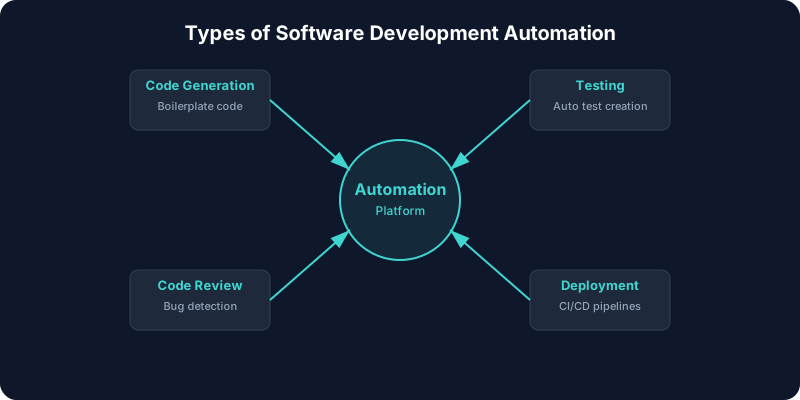
Let me break down the categories:
Code Generation Automation
Software development automation that writes code:
- Template engines - Generate code from templates
- AI code generators - Generate code from descriptions
- Scaffolding tools - Generate project structure
Testing Automation
Software development automation for testing:
- Unit test generators - Create tests automatically
- Integration test runners - Run tests automatically
- E2E test automation - Test entire workflows
Deployment Automation
Software development automation for deployment:
- CI/CD pipelines - Automate build and deployment
- Infrastructure as code - Automate infrastructure setup
- Rollback automation - Automate rollbacks on failure
Monitoring Automation
Software development automation for monitoring:
- Error tracking - Automatically detect and alert on errors
- Performance monitoring - Track performance automatically
- Log analysis - Analyze logs automatically
Real Results from Software Development Automation
Let me share real numbers:
Team A: SaaS Startup
- Before: 4 developers, 6 months for MVP
- After: Same 4 developers, 6 weeks with software development automation
- ROI: 4x faster development
Team B: E-commerce Platform
- Before: Manual testing took 2 days per release
- After: Automated testing takes 2 hours
- Quality: 50% fewer bugs in production
Team C: Mobile App
- Before: Manual deployment process, 4 hours per release
- After: Automated deployment, 10 minutes
- Frequency: Shipping daily instead of weekly
These results are typical with software development automation.
How to Implement Software Development Automation
Here's your roadmap:
Step 1: Identify Repetitive Tasks
What takes the most time? What's repetitive? Start there.
Common targets for software development automation:
- Writing boilerplate code
- Running tests manually
- Deploying code manually
- Reviewing code manually
Step 2: Choose Your Tools
Pick software development automation tools that fit your stack:
- BuildCycle - Complete automation platform
- GitHub Actions - CI/CD automation
- Jest - Test automation
- Docker - Deployment automation
Step 3: Start Small
Don't try to automate everything at once.
Pick one task. Automate it. See the results. Then expand.
Step 4: Train Your Team
Your team needs to understand the software development automation tools.
Provide training. Document processes. Make it easy to use.
Step 5: Measure Results
Track time saved, bugs reduced, features shipped.
Use data to decide what to automate next.
Best Practices for Software Development Automation
Here's how to maximize your results:
1. Automate the Right Things
Not everything should be automated. Focus on:
- Repetitive tasks
- Error-prone processes
- Time-consuming activities
- Quality-critical steps
2. Maintain Human Oversight
Software development automation handles the work, but humans make the decisions.
Keep approval gates for:
- Production deployments
- Architecture changes
- Security decisions
- Business logic changes
3. Test Your Automation
Software development automation needs testing too.
Test your automation:
- In staging first
- With small changes
- With rollback plans
- Regularly
4. Document Everything
Document your software development automation:
- What it does
- How it works
- How to use it
- How to modify it
5. Iterate and Improve
Software development automation isn't set and forget.
Review regularly. Improve processes. Add new automation as needed.
Common Mistakes with Software Development Automation
Here's what to avoid:
Mistake 1: Automating Too Much Too Fast
Start small. Learn. Then expand.
Mistake 2: No Human Oversight
Keep humans in the loop for critical decisions.
Mistake 3: Poor Testing
Test your software development automation thoroughly.
Mistake 4: No Documentation
Document everything. Future you will thank you.
Mistake 5: Set and Forget
Review and improve your software development automation regularly.
The ROI of Software Development Automation
Let me break down the numbers:
Time Savings
Most teams save 20-30 hours per week with software development automation.
At $100/hour developer cost, that's $2,000-$3,000 per week saved.
Quality Improvements
Software development automation catches bugs early, reducing production issues by 40-60%.
Faster Shipping
Teams ship features 3-5x faster with software development automation.
Cost Reduction
Fewer developers needed. Faster time to market. Lower costs.
Developer Satisfaction
Developers enjoy their work more when they focus on interesting problems.
Software Development Automation Tools
Here are the tools I recommend:
BuildCycle
Complete software development automation platform. Handles the entire development cycle.
GitHub Actions
CI/CD automation. Great for deployment automation.
Jest
Test automation. Fast and reliable.
Docker
Containerization and deployment automation.
Jenkins
CI/CD automation with extensive plugins.
Future of Software Development Automation
Here's where this is heading:
More Automation
More of the development process will be automated.
Better AI
AI will understand context better and make smarter decisions.
Faster Processes
Development cycles will get even faster.
Lower Costs
As tools improve, costs will decrease.
Better Quality
Automated testing and review will catch more issues.
My Take on Software Development Automation
I've seen teams transform with software development automation.
The teams using it are shipping faster, spending less, and building better software.
The ones who resist are falling behind.
Software development automation isn't replacing developers. It's making them unstoppable.
The question isn't whether software development automation works. It does.
The question is: when are you going to start?
Start with one task. See the results. Then expand.
That's how you win with software development automation.